Hello everyone
I’m not that great with all this stuff but I’ll “briefly” try and explain my problem. I’m doing subtitling for an anime in aegisub and recently noticed that the intro for two episodes had some video glitches (two green frames). Fortunately since it’s anime and in the first second, lots of the episodes share the same intro.
To fix this: My plan was to open the mkv in avidemux and splice in another intro. All videos are the same video and audio specs: MPEG-4/AVC with FLAC audio.
After doing this, I previewed the avidemux file in Aegisub and all was fine (just to state that avidemux was set to Copy for both video and audio and spliced on the keyframe else it would complain about video corruption). Video frame sync was perfect and audio sync was also perfect. As this is a splice, there is a tiny little audio “pop” at the splice point. My friend told me to just totally replace the audio with the original file with mkvtoolnix which is obviously a much better idea. That not only fully fixes the green frame issue, but also no audio pop.
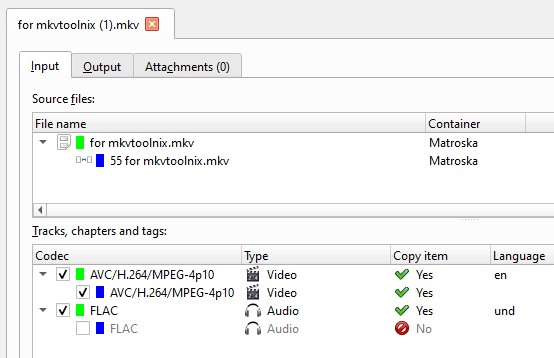
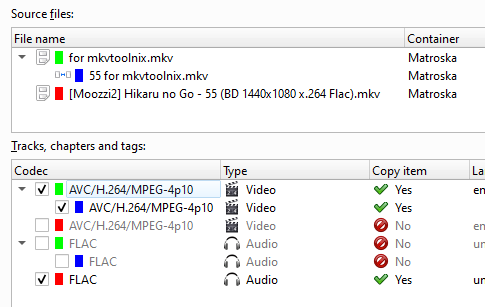
So in mkvtoolnix gui, I stick in my avidemux file with the original file, take the video from avidemux and the audio from the original file and mux. Audio pop is ofcourse gone now but since I’m doing subtitling, the audio is now slightly off inside aegisub. It’s off by either 2 or 3 frames. As it’s an anime, it’s a 23.976 fps video.
Nothing I did in mkvtoolnix would fix this besides attempting to put in some delay number but that’s a band aid to a problem that shouldn’t exist. After doing more research, I looked into ffmpeg and ran this command:
ffmpeg -i avidemuxfile.mkv -i raw.mkv -acodec copy -vcodec copy -map 0:v:0 -map 1:a:0 muxed.mkv
That gave me exactly what I wanted. No green glitches, no audio pop and audio sync is now perfect. I just can’t udnerstand why mkvtoolnix was having problems. After digging more, I found something interesting in the gui, under properties of the audio in mkvtoolnix gui:
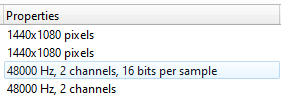
The avidemux file does not state “16 bits per sample”. If I take two files that do have “16 bits per sample” then mux, the audio sync is fine. I can only assume that the avidemux file not reporting 16 bits is somehow messing with mkvtoolnix. I thought to myself “ok I’ll split then join in mkvtoolnix” without knowing what to really do but all I know is the split point in avidemux is 00:00:07.341 (the first keyframe in the files).
I go to output tab in mkvtoolnix and put this in:
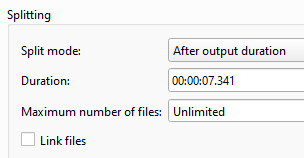
This error comes up “The track ID 1 from the file ‘file path’ cannot be split. Splitting tracks of this type is not supported.”
I know under additional options there is “–engage append_and_split_flac” but the related info seemed like that was a really bad idea and tbh even if I got that to work, I have no idea how I’m supposed to then take that 7.341 second intro and put it into another mkv with then taking out 7.341 seconds from that mkv… if that makes sense.
I know that ffmpeg fixed my problem but I’d still like to know why mkvtoolnix has problems.
So basically if anyone knows either:
1: A program like avidemux that allows easy editing/exact copy mode (even just keyframes) that will keep the “16 bits” for mkvtoolnix
2: How I could do commands in the gui of mkvtoolnix to take 7.341 seconds from a “good” intro and then put that into another mkv while taking out 7.341 seconds from the same file.
Hopefully that made sense. If needed I can send video files (about 600MB each).