SOLVED - problem is MEDIAINFO (gui nor cli) does not include codec-name attribute. mkvtoolnix and mkvmerge -J does. I will post to MEDIAINFO as a missing feature.
hi,
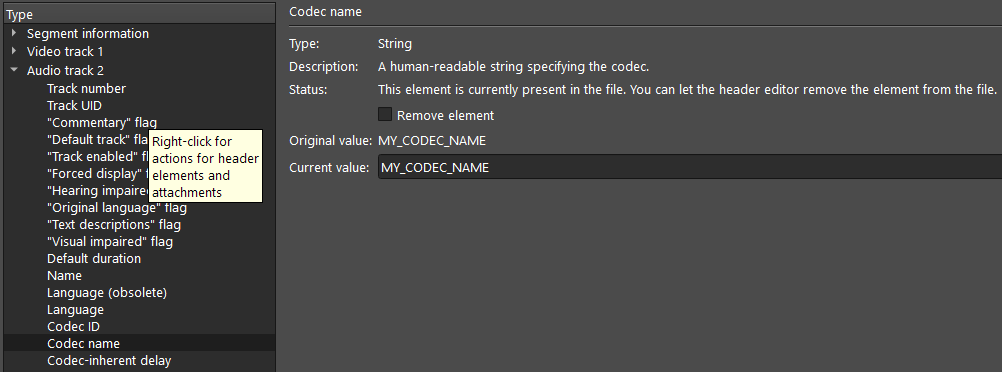
“Codec Name” in the gui (screenshot below) - what is the actual attribute this maps to in the file, i.e. to get that field using cmd line MediaInfo –Inform. Audio stream specifically.
on the same file using MediaInfo:
DOS> “C:\Program Files\MediaInfoCli\MediaInfo” --Inform=“Audio;%ID%, %Title%, %CodecID%, %CodecID_Description%, %Channels%\n” “Deadpool (2016).mkv”
outputs (notice the CodecID_Description is empty):
2, DD TrueHD 7.1 Atmos, A_TRUEHD, , 8
3, DD 5.1, A_AC3, , 6
for CodecID_Description I have tried CodecID_Description, CodecName, Codec_Name, CodecShortName and a few others and nothing comes out in MediaInfo even though I can see “Codec Name” in the mkvtoolnix GUI.
Maybe this is a custom tag?
thanks
wavestar
Welcome!
Not sure what piece of information you’re actually talking about as there’s nothing labeled “Codec name” exactly. There’s the column labeled “Codec” in the multiplexer’s “Tracks, chapters and tags” list. Assuming you mean this one: that’s a mapping happening inside mkvmerge where whatever the source container uses to identify for codecs (e.g. FourCC codeds, indicators in elementary streams, Matroska’s CodecID track header element, or just the fact that something comes in a very basic container such as a VobSub file which can only contain VobSubs) is mapped to a human-readable name.
Due to how different different file (container) formats signal codec types there is no simple mapping table or anything like that. It’s just a lot of code that maps container-specific logic into internal numeric IDs and those internal numeric IDs are then mapped to translatable, human readable strings during display.
I cannot tell you anything about MediaInfo.
Hi!
Thanks for quick reply  I have updated the original post to be a bit more clear!
wavestar
Oh you mean the header editor; I hadn’t though of that. You’re right, there’s one labeled “Codec name”.
The header editor directly exposes the track header elements that are or are not present in the file & let’s you edit them. This “Codec name” track header element is an optional, human-readable name that can be set by whoever created that file, be it a person or a piece of software. It is not supposed to be used by playback software to determine which codec to use. MKVToolNix has no special provisions for setting this field. If you have a file that has the field set, that was done by whoever or whatever created the file.
I cannot tell you what it maps to in MediaInfo.
You can set and unset this field in mkvtoolnix and it persists. It’s not derived. So my simple question is what is this attribute in the file! I expect if I knew how to I could look in the code to see where it is getting this from in the source file lol
Context: used mkvtoolnix for many many years to manually update the attribs from my makemkv rips. Always used Code Name to set a short desc of the codec. I am now trying to automate this using cmdline mediainfo/mkvpropedit.
You cannot set it with mkvmerge. You can set it with mkvpropedit; the property name is codec-name.
BTW, you can list all property names with mkvpropedit -l if you’re unsure about a specific name.
yep, I am using mediainfo to GET the current header, mkvpropedit to SET.
mediainfo --Inform=“Audio;%codec-name%” does not return anything either.
As I’ve said before: I cannot help you with MediaInfo.
mkvmerge -J yourfile.mkv outputs the codec name, if you want to use something else than MediaInfo.
Thank you! for you help.
Yes, mkvmerge shows the codec-name ok.
Problem is MediaInfo, neither GUI nor CLI seem to pull back codec-name