Is it possible to have the segment map added as part of the import dialogue as another column on the left under Scanned Files
Welcome!
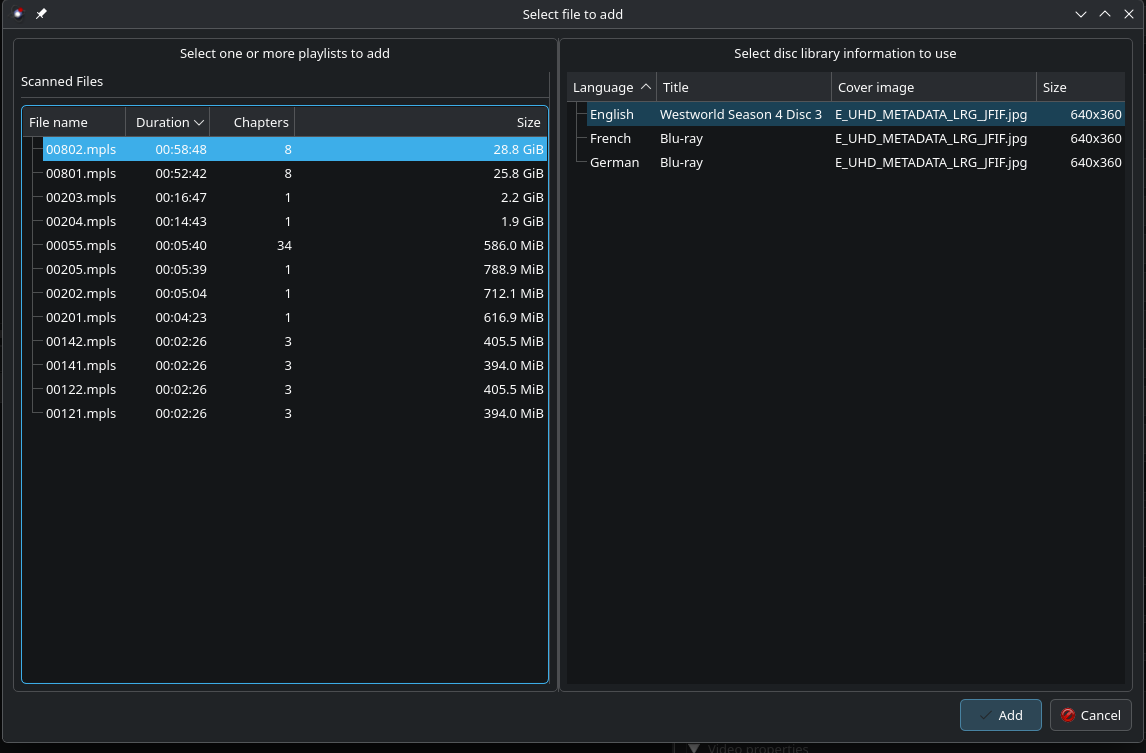
What exactly do you mean by “segment map”? The list of M2TS files the selected MPLS refers to? That information is present in the default presentation of that dialog, which looks like this:
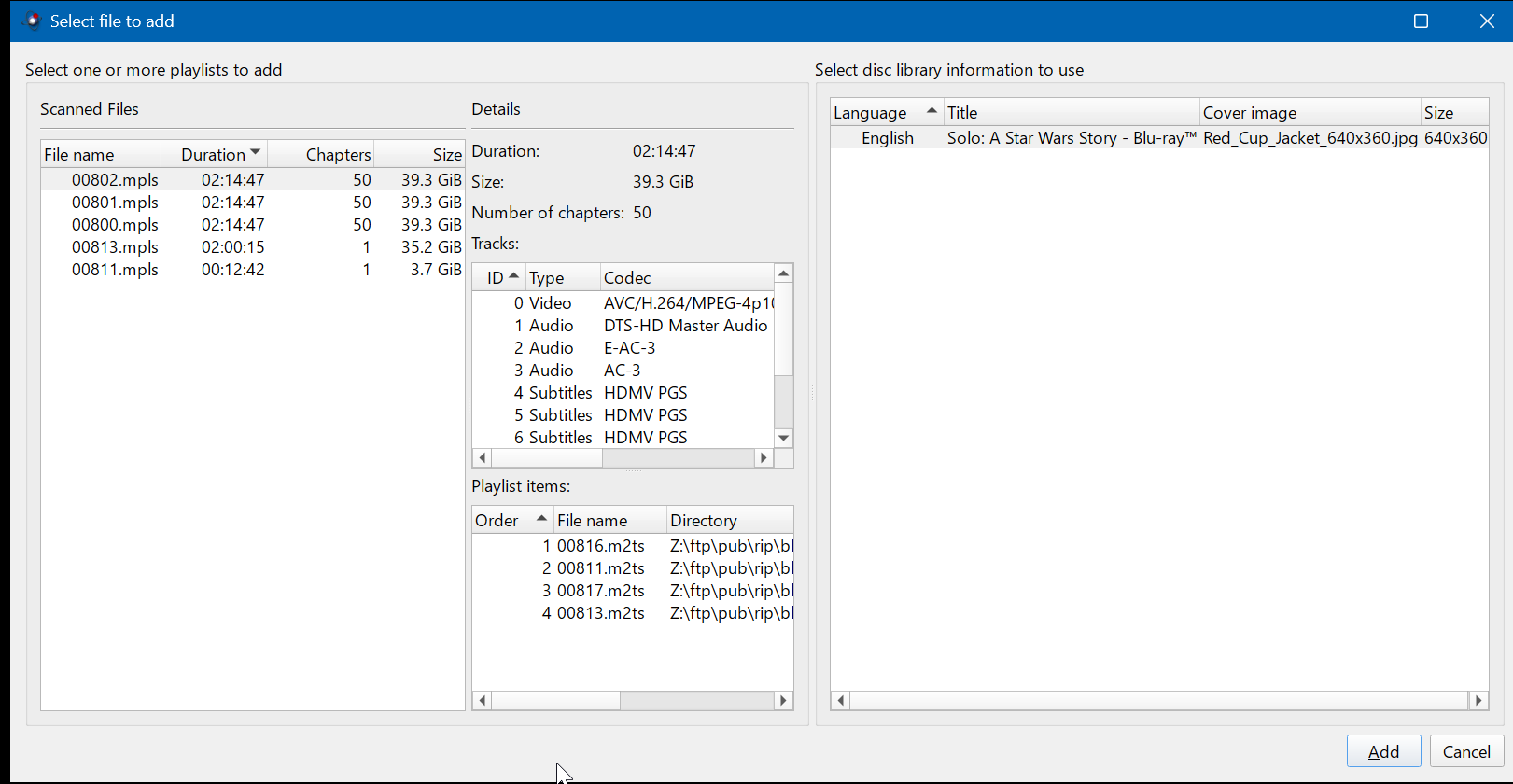
In your case your left side (“Select one or more playlists to add”) only shows its left part, which means that you dragged the slider separating those two parts over to the right at one point, causing the “Details” pane to be hidden. That slider should still be present, you can just drag it to the left again, revealing that panel.
If you mean something else you’ll have to get into more details.
Thanks for the welcome and getting that details window back into view. Great software by the way. It has definitely changed my workflow and preference for the software I use to make MKVs. The segment map I am referring to is the order in which discs containing episodes are to be played. In the event of episodes being out of order when imported and me being the user cant discern what is episode 1-*. Westworld Season 1 has 10 episodes mpls 103 was segment 58, 105 segment 38 and 107 segment 39. Without the segment (order my terminology may be off) it would be impossible for me to understand the order to be 105, 107, 103.
Currently the workflow would be to use another piece of software(not sure the rules on mentioning other software names) or to watch the series while taking not of what mpls was playing or looking at episode timings and match them up with what has been imported.
In the screenshot provided 801 and 802 are episodes 1 and 2 (this one a little more straight forward Season 1 was all over the place) it just so happened that 801 was episode 1 and 802 was episode 2 that wasnt the case for the otehr discs.
Banshee was another example and if Im not mistaken The Last of Us was another.
Ah, I see. Unfortunately that information is not necessarily stored in an easy to access anywhere, or at least I don’t know how exactly. Furthermore Blu-rays can use Java-based menus, and that runs Java code, something I cannot do & do not intend to parse somehow.
I can look into it if you can get some pointers which piece of the Blu-ray stores this type of information. In the index.bdmv, I guess? Though this table only references the movie objects, it doesn’t contain a list of titles. I could add the information at which position the selected MPLS is supposed to be played (aka its “title number”), I guess. That wouldn’t require big UI changes at all, just a bit of index.bdmv parsing & an additional column.
It’s perfectly fine to mention other pieces of software here, no matter if they’re Open Source or not. I guess you’re referring to MakeMKV, which I use as well.
Gotcha!!! This disc is a Java based disc and I understand the lift it would take to include something similar to MakeMKV which is what I used to identify the order in which I needed to import and process the episodes.
My initial AI based search pointed me here
The “segment map” is a concept used in software like MakeMKV to describe the order of video segments for a specific title. In the official Blu-ray specifications, this information is part of the playlist file structure, specifically within the
BDMVdirectory in thePLAYLISTsubdirectory[1, 2, 3, 4]
The relevant components of the Blu-ray file structure are:•
\BDMV\PLAYLIST\folder: This directory contains the (movie playlist) files. These files define the playback sequence for a movie or title, including chapter information and available audio/subtitle tracks. The “segment map” is essentially the ordered list of video clips defined in a specific file.
•\BDMV\STREAM\folder: This directory contains the actual video and audio data in (MPEG-2 Transport Stream) files. The numbers listed in the “segment map” of an file correspond to the filenames (e.g., , ) in this folder. [1, 2, 5, 6, 7]Therefore, the segment map information is not a single, physically separate file, but an integral part of the file specification within the broader Blu-ray Disc specifications for Read-Only Disc/Part 3. Video Application. [8, 9, 10]
AI responses may include mistakes.
[1] How to select specific segment map / M2TS to create MKV? - www.makemkv.com
[2] multiple files with same size - www.makemkv.com
[3] https://www.reddit.com/r/makemkv/comments/1jaw73w/special_features/
[4] .m2ts - Wikipedia
[5] multiple files with same size - www.makemkv.com
[6] A Better Way To Find The Correct Playlist/Segment Map - www.makemkv.com
[7] .m2ts - Wikipedia
[8] https://customplay.com/patents/9183884.pdf
[9] HTTP Streaming Archives - gpac.io
[10] Subtitles
Im looking for a tool that will allow me to see what is contained in the mpls files. They seem to be binary. I guess Im gonna learn Bluray structure today!!!
I already have a parser for the index.bdmv file, and I have its official documentation — that part is not a problem. I just haven’t used that information until now.
Give me a day or two to implement something before you spend a lot of time here; maybe what I’ll come up with suffices.
1 Like
Eh, parsing index.bdmv is not enough, I also need to parse MovieObject.bdmv for which I don’t have a parser yet (I do have the documentation). It’s not overly difficult, but give me more than one or two days 
Will do! Mean while I will see if I can find some documentation on how to maybe parse the mpls
No worries, I have the official docs for all Blu-ray structures, which includes the play lists. mkvmerge does parse them; it’s the basis of what you see as the “select file to add” dialog.
The information that I still need to parse & evaluate is:
index.bdmv— here a number of “movie objects” are referenced; this is easy to parse- “movie objects” refer to data in
MovieObject.bdmv, which I have no parser for yet.MovieObject.bdmvcontains a number of “movie objects”; each “movie object” consists of a number of “play commands” such as “jump to menu”, “play playlist number XYZ”, mathematical commands such as “set register X to Y”, “add value X to register Y”, “compare values” etc. Unfortunately this means that I have to implement a parser that not only parses the binary data structures but also interprets those “play commands” as the “play playlist number XYZ” command can either refer to a fixed number (easy to parse) or to a value of a register (this requires interpreting/executing all prior “play commands” for that “movie object”).
And after all of that mkvmerge can, when reading a playlist:
- iterate over all “movie objects” referenced from
index.bdmv - for each of those interpret the associated “play commands” until a “play playlist number XYZ” is found & compare the resulting playlist number with the playlist mkvmerge is currrently handling
- if a match is found, the “movie object”’s position in the
index.bdmvis the title number
It’s not difficult, just a lot of menial work.
Any promising news on if this is something feasible or not?
Unlikely. Implementing a full-blown command interpreter turned out to be much more work than I thought initially, and I’m nowhere near done. I won’t totally abandon the idea, but I don’t think I’ll complete it any time soon.