Is there a way to permanently delete tags and global tags by default?
So I don’t have to remove them manually.
MKVToolNix for MAC
- MKVToolNix GUI version: 92.0
- mkvmerge version: 92.0
Thanks for your help.
Is there a way to permanently delete tags and global tags by default?
So I don’t have to remove them manually.
Thanks for your help.
Yes, you can can:
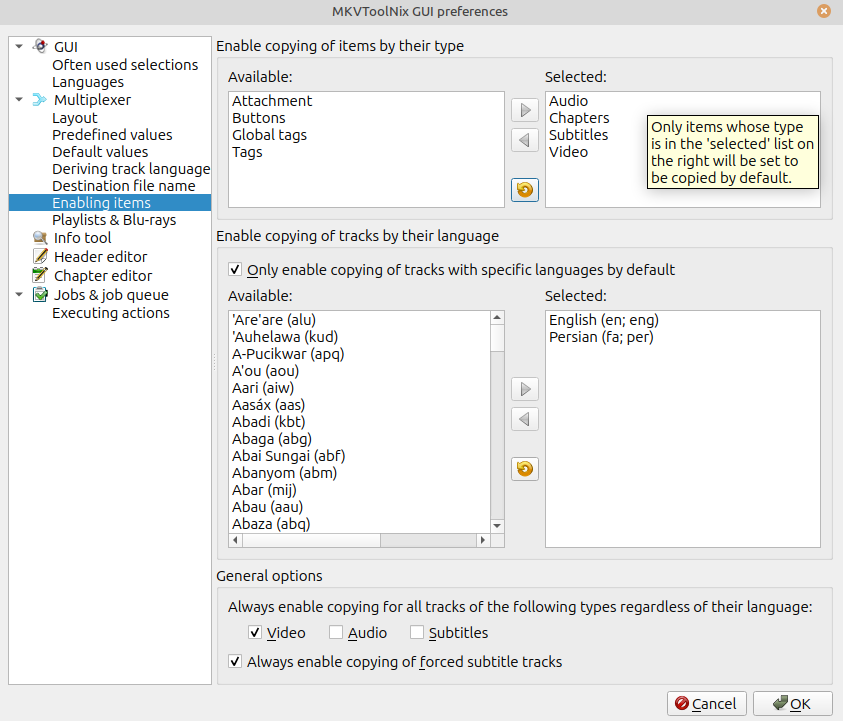
In MKVToolNix GUI, select Multiplexer, then Ctrl+P (or MKVToolNix GUI | Preferences)
Expand the Multiplexer section if not already and choose “Enabling Items”
Move the items you want to keep in the file from the “Available” pane to the “Selected” pane.
(Leave the “Global Tags” and “Tags” in the “Available” pane, along with any other things you DO NOT want included in the output file).
An example of the preferences dialog box is below.
(Optional) Similarly, you can add the tracks (audio and subtitle, typically) with specific languages to those that are kept by checking the box next to “Only Enable copying of tracks with specific languages by default” and then moving the languages you want to keep.
(Optional) Check out other settings in the Preferences dialog box - you may find other options in there that are useful.