Help with creating a batch file

Hi there

I’m hoping @mbunkus or someone else can help guide me in the right direction. I would really appreciate it.

For the past 5 months I have been subtitling a 75 episode Japanese anime and I am now at the end of the project. What I currently have:

It’s 75 folders that each contain an mkv, the corresponding .ass subtitle file, fonts and an xml chapter file. A look into one folder:
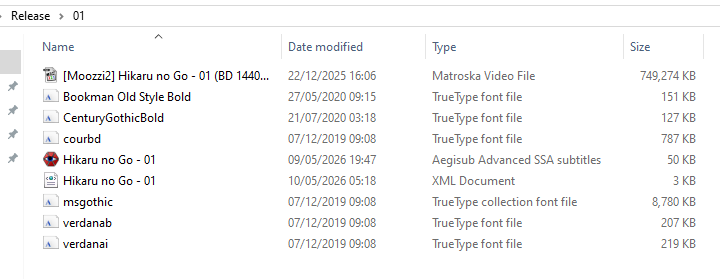
I want to mux all these files together into 75 different mkv files into a singular folder. I know I could do it manually but thought batch would limit any mistakes.

Things I want done:

1: In mkvtoolnix gui, each mkv file I have as the source is video with id 0 and audio language is und with id 1 (both default tracks). I just want to set the audio language to Japanese.

2: For the subtitle file, set the language to English and have the name of the subtitles set to E-F Restoration. However, once getting to folder 40 and onwards, change this to R-F Restoration.

3: The output files should have a naming convention of [E-F Restoration] Hikaru no Go 01.mkv, 01 is the name of the corresponding folder but like point 2, change this starting episode/folder 40 to [R-F Restoration] Hikaru no Go 40.mkv (so as an example the very last file should also be named [R-F Restoration] Hikaru no Go 75.mkv)

4: Fonts needing attached are either ttf otf ttc filetypes.

5: Put the output mkvs into a different folder called Done or similar.

I tried to see if AI would do it and each time it gave me different solutions. One such example:

@echo off
setlocal enabledelayedexpansion

set “BASE=%~dp0”
set “OUT=%BASE%Done”

if not exist “%OUT%” mkdir “%OUT%”

for /L %%I in (1,1,75) do (

rem Format folder number as 2 digits
set "EP=0%%I"
set "EP=!EP:~-2!"

set "FOLDER=%BASE%!EP!"

rem Get input files
for %%F in ("!FOLDER!\*.mkv") do set "MKV=%%F"
for %%F in ("!FOLDER!\*.ass") do set "SUB=%%F"

rem Skip if missing main file
if not defined MKV (
echo Skipping episode !EP! - no mkv found
goto :next
)

rem Decide naming + subtitle title
if %%I LSS 40 (
set "STYLE=E-F Restoration"
) else (
set "STYLE=R-F Restoration"
)

set "OUTFILE=%OUT%\[!STYLE!] Hikaru no Go !EP!.mkv"

echo Muxing Episode !EP!...

mkvmerge -o "!OUTFILE!" ^
--language 0:jpn ^
--track-name 2:"!STYLE!" ^
--language 2:eng ^
"!MKV!" ^
"!SUB!" ^
--attachment-mime-type application/x-truetype-font "!FOLDER!\*.ttf" ^
--attachment-mime-type application/vnd.ms-opentype "!FOLDER!\*.otf" ^
--attachment-mime-type application/x-truetype-font "!FOLDER!\*.ttc"

:next

)

echo Done.
pause

Is something like this remotely close? Honestly I’m too scared to run anything so far as I don’t want to mess up the file/folder structure. If anybody knowledgeable could look at this to do a script I would be really grateful.

Unfortunately I really don’t know enough about scripting with Window’s batch files to make a good judgement on whether or not what you pasted does what you want it wo, nor if it doesn’t run the risk of overwriting something essential. I doubt the latter as mkvmerge has provisions for refusing to write to a file with the same name as one of its source files — though I wouldn’t bet money on it to be 100% effective.

One thing that’s definitely wrong is the track IDs used in the mkvmerge command-line. The thing is that file- or track-specific options like --atracks or --language only apply to the following source file name. Therefore the --track-name 2:… and --language 2:eng apply to "!MKV!” instead of to "!SUB!”, and as far as I understood your post you want to apply those to the subtitles.

Instead each source file has its own set of track IDs, most source files will have a track ID 0, for example.

Another thing that’s obvious is that the 0:jpn is wrong as 0 is the track ID for the video track, as you write yourself.

In your case it should be more something like --language 1:jpn “!MKV!” –language 0:eng –track-name 0:”!STYLE!" "!SUB!"`

But, and that’s a big bug: I cannot comment on whether that "!VARIABLE!” syntax is correct, whether those variables are calculated correctly etc.

Sorry.

Thanks. I even asked the AI about that track thing before and it gave me some weird explanation before just admitting that yes, 1 should have been picked.

“No — in mkvmerge, track numbering for command options is relative to the file currently being added, not the visible track IDs you see in MKVToolNix GUI." The 0 refers to the first non-video track being targeted in that context for language assignment. However, to be fully explicit and avoid ambiguity, the safer/correct approach is to specify the actual track IDs from the MKV file.”

I’ll leave this up for a couple of days to see if someone has a good idea but I’ll likely just do this manually for each episode. Should only take about 2 hours I guess.

One thing I used to do to make sure my batch file was correct was to make a backup copy of the source files. If my batch file did not work as expected I’d restore from the backup and repeat with a modified batch file. On a bad day I might need 6 tries, but no harm done.

@mbunkus Sorry to bother you again but small update and question. I got what I think is a good script. To help the AI, I manually did one episode in the gui and copy/pasted the command line output.

Did a test run as WhiteBeard said and seems fine. I won’t copy/paste the whole script but this was command line argument:

“!MKVMERGE!” --ui-language en --priority lower --output “!DONE_DIR![!PREFIX!] Hikaru no Go !num!.mkv” --language 0:en --display-dimensions 0:1440x1080 --language 1:ja “(” “!mkvfile!” “)” --language 0:en --track-name “0:!PREFIX!” “(” “!assfile!” “)” !fonts_cmd! --chapter-language en --chapters “!xmlfile!” --generate-chapters-name-template “Chapter NUM:2” --track-order 0:0,0:1,1:0

One thing I’m not sure about is the language of the chapter file. As you can see I set “–chapter-language en” which came from gui command line but when you put the resulting file into mkvtoolnix, the chapter file does not show a language. This happens if I do it with the batch or manually. Is this right? How can I make sure the chapter file has been set to english? My xml files do have the chapter language set to eng if that helps.

--chapter-language is only used for formats that don’t provide language information (e.g. the simple chapter format, CUE sheets, Blu-ray chapters etc.) or when generating chapters. It is ignored when reading chapters from XML files as the assumption is that those contain ChapLanguageIETF elements (or the legacy elements, ChapLanguage) for the language of each entry.

Then you’ve already done what you need to do.

--generate-chapters-name-template only makes sense in combination with --generate-chapters mode selecting one of the available modes for generating chapters (when appending or after a fixed interval). If you don’t use --generate-chapters … no chapters will be auto-generated. Chapters will still be read with --chapters …, of course; that option is completely independent of --generate-chapters ….