Hello,
When I add multiple files/tracks to multiplexer and when I am going to remove all I have to right click and then scroll and then click remove all files to remove. Or I have to select all tracks and then click delete on my keyboard. It becomes very heavy task if you have more than 100 files to do so. I will have to right click , then scroll and then select and click remove all. Why don’t we add a button “remove all files”. When finished, we will just click on the button and it will remove all the files, Like it used to have in version 5.7 “The Whirlwind”. It will be very quick to remove files. Here is the screenshot of v5.7 Screenshot by Lightshot
This was a fantastic button. Makes my work load almost zero. Can you please add this button?
You can also just press Ctrl+N (or “Multiplexer” menu → “New settings”), which gives you pristine new settings, which is preferable in 99% of all cases. Solely removing the source files does not clean everything else, too; things such as the movie title (segment title), additional chapters, splitting settings, manually added attachments etc. will all be kept.
The old GUI (“mkvmerge GUI” it was called) didn’t have the concept of different multiplex settings or having more than one set of settings open at the same time. Therefore “remove all” was needed. With the current design it’s simply not needed in most cases and even harmful/not what the user actually wants in a lot of them.
That’s why there won’t be a “remove all” button.
I keep same settings for all my files, like I keep same movie title (My Username), same attachment (my logo) for all of my files. So I don’t need to change this. So, I mean, I only remove source files always, and don’t remove other things. So it will be best for me. and You can write “remove all source files” in button name, so people won’t be confused by this button.
I put a video track, then add some audio tracks, then some subtitles. and start multiplexing. Now I have to right click and then scroll and then find “remove all” and then click on it to remove files.
Then again I add a video track, some audio and subtitle tracks, then again I have to remove by doing right click and all. So it becomes very hard and time taking process for me. It will be very fine and quick with just a button “remove all”
There won’t be such a button. For your use case you can simply use the “start multiplexing & remove all source files” functionality:
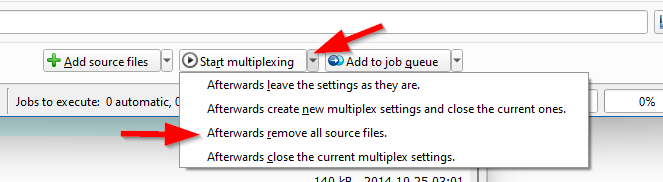
Same can be done with “add to job queue”.
You can even set that to be the default action in the preferences.
There simply is no need for an extra button.
Dear, I don’t want my files to be removed automatically. Many times I have to look again which source files I have added. So automatic removal is not gonna work for me. So, I need a button to remove whenever I need. So a button will be very preferable for me.
Also, Still it is not handy and I have to click and carefully select “afterwards remove all source files”, So a button can be very quick.
You can add this button feature and it be default hidden. The person who needs it can enable it in settings/preferences. So it won’t create problems for all users either.
Thank You for understanding.
No, I will not add a button just so that you can save a second or two in your workflow. I really don’t want to add more duplicated functionality. Right-click anywhere in the “source files” & select “remove all files” from the popup menu. It’s a single mouse click more.
I won’t reply to this thread anymore.
Can you please tell me keyboard shortcut/hotkey for this? Or can we create keyboard shortcuts ourselves?
And can you give any link to read all the existing keyboard shortcuts?