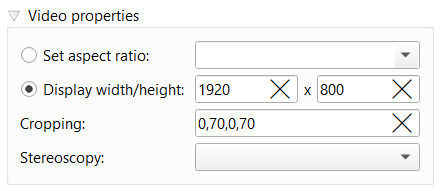
I’m trying to change the aspect ratio of a video from 2.39:1 to 16:9, which should easily be accomplished by cropping out the reduntant width off the video.
I’ve tried several different ways, but nothing seems to work.
First I tried checking the “Set aspect ratio” button and changing it to 16:9, and then mux. This just caused the video to stretch the image to fit the new aspect ratio.
Then I tried doing the same again + cropping 0,70,0,70 (I tried a few times to get to this specific number), and then mux. But again, the video just stretched the image to fit the new aspect ratio.
Then I skipped setting an aspect ratio, and instead just cropped 0,70,0,70, and then muxed. But the same thing happened again.
Why isn’t mkvtoolnix cropping the sides of the video? Why is it only stretching the video to fit the aspect ratio and making the image look distorted?
I’m using VLC to play the video.
And yes, I know that I can change the aspect ratio within VLC, but I want to change it with mkvtoolnix.
So what am I doing wrong?